
TL;DR:
- Effective email marketing requires sending the right message at the right time through automated workflows that respond to subscriber behavior. Building these workflows with clear goals, clean data, and continuous optimization enhances conversions and revenue. Incorporating AI and real-time segmentation ensures smarter, more personalized campaigns that align with business objectives.
Most marketing teams send emails. Far fewer send the right email to the right person at the right moment. That gap is where revenue disappears. A well-structured email marketing workflow closes it by replacing guesswork with repeatable, automated sequences that respond to real subscriber behaviour. Automated campaigns generate 320% more revenue than manual batch sends, and the difference is not clever copywriting. It is architecture. This guide walks you through exactly how to build, execute, and optimise workflows that convert.
Table of Contents
- Key takeaways
- Building your email marketing workflow foundation
- How to create email workflows step by step
- Common mistakes that kill workflow performance
- Measuring and optimising your workflows
- My honest take on where most workflows go wrong
- How Nulifedigital can build your growth engine
- FAQ
Key takeaways
| Point | Details |
|---|---|
| Set measurable goals first | Define what each workflow must achieve before choosing triggers or building sequences. |
| Data quality is non-negotiable | Clean lists and proper authentication (DMARC, SPF, DKIM) determine whether your emails reach inboxes at all. |
| Triggers beat calendars | Behaviour-based triggers outperform scheduled batch campaigns for engagement and conversion. |
| Segment dynamically | Use real-time behavioural data to update subscriber groups automatically and keep messaging relevant. |
| Measure downstream actions | With open rates becoming unreliable, focus on conversions and repeat purchases as true performance indicators. |
Building your email marketing workflow foundation
Before you map a single trigger or write a subject line, you need to sort out the basics. Skipping this step is the single most common reason workflows fail after launch.
Define your goals clearly
Successful email programmes treat strategy as infrastructure. A useful test: if you cannot define a workflow’s goal in six words or fewer, it is not specific enough. “Convert trial users to paid subscribers” passes. “Improve email performance and nurture leads” does not.
Clean your list before you automate
Sending volume to a dirty list does not just waste money. It damages your sender reputation in ways that take months to repair. Verify addresses, remove hard bounces, and suppress disengaged subscribers before you connect any automation.
Technical authentication matters just as much. Optimising DMARC, SPF, and DKIM is foundational. Without these records in place, inbox providers will filter your emails before any subscriber ever sees them, regardless of how good your content is.
Choose your tooling
Here is a quick comparison of common email automation platforms to help you choose:
| Platform | Best for | Standout feature | Pricing model |
|---|---|---|---|
| Klaviyo | E-commerce brands | Deep Shopify integration | Usage-based |
| ActiveCampaign | SMBs and agencies | Visual workflow builder | Tiered subscription |
| HubSpot | B2B and enterprise | CRM-native automation | Freemium to enterprise |
| Mailchimp | Beginners and SMBs | Ease of use | Freemium |
| Brevo | Transactional + marketing | Multichannel automation | Free tier available |
Your platform choice should follow your business model. An e-commerce brand scaling towards £100k per month needs different depth than a B2B consultancy managing a small prospect list.

Pro Tip: Before committing to a platform, map your most critical workflow in detail. Then confirm the platform can execute every step natively, without third-party workarounds.
How to create email workflows step by step
Once your foundations are solid, building the actual workflow is a structured process. Follow these steps and you will avoid the chaos that comes from building sequences reactively.
-
Choose your trigger type. Every workflow starts with a trigger. Behavioural triggers fire based on subscriber actions (clicking a link, abandoning a cart, visiting a pricing page). Time-based triggers send after a defined interval. Event-driven triggers respond to external data, such as a purchase date or a contract renewal.
-
Map the customer journey stage. A subscriber who just signed up for your newsletter is in a completely different mindset to someone who viewed your checkout page three times without purchasing. Nearly one in five customers abandons a shopping cart. Capturing that intent with a real-time trigger, rather than a weekly newsletter, changes conversion rates dramatically.
-
Build your sequence. Decide how many emails the sequence needs, the spacing between them, and the goal of each individual message. A welcome series might run three to five emails over ten days. A re-engagement workflow might send two emails over a fortnight before suppressing non-responders.
-
Personalise with purpose. Subject line personalisation using the recipient’s first name increases open rates by around 27%. For AI-driven personalisation at scale, generate content variants at the segment level rather than attempting individual generation for every subscriber. This preserves scalability and native tracking through your ESP’s API without the prohibitive cost of full one-to-one generation.
-
Test before you go live. Send test versions through every branch of your workflow. Check personalisation tokens, confirm links resolve correctly, and verify that triggers fire as expected in your platform’s preview mode.
Here is a summary of the three most common workflow types:
| Workflow type | Trigger | Content focus | Primary goal |
|---|---|---|---|
| Welcome series | New subscriber sign-up | Brand story, value proposition, first offer | Engagement and first purchase |
| Abandoned cart | Cart abandonment event | Product reminder, social proof, urgency | Recover lost revenue |
| Re-engagement | 60 to 90 days of inactivity | “We miss you” offer, preference centre | Reduce list churn |
Pro Tip: Build a simple decision branch into your welcome series. If a subscriber clicks your product link in email two, move them into a purchase-intent sequence immediately rather than continuing the generic onboarding path.
Common mistakes that kill workflow performance
Automation does not fix a broken strategy. It scales it. These are the errors that cause otherwise well-built workflows to underperform.
- Ignoring data hygiene post-launch. Lists degrade at roughly 20 to 25 percent per year. A workflow built on stale data delivers poor results and wrecks deliverability over time.
- Over-automating without reviewing. Sending too many emails too quickly creates subscriber fatigue. Watch your unsubscribe rates by sequence. If they spike on email three every time, that is a signal, not a coincidence.
- Using static segmentation. Dynamic lists that update automatically outperform static segments for workflow accuracy. Subscribers should enter and exit sequences based on real-time behaviour, not a list export from last quarter.
- Misaligning workflows to business goals. A workflow that generates opens but no conversions is not a success. Tie every sequence to a measurable commercial outcome from day one.
- Not maintaining or updating workflows. A workflow built in January 2025 may reference outdated offers, expired promotions, or product lines you no longer carry. Schedule a quarterly audit as standard.
“Most workflow failures I see are not technical. They are strategic. The automation worked exactly as designed. The design was just wrong from the start.”
Pro Tip: Set up a simple logging process in your ESP so you can trace exactly which step a subscriber is on when they convert, unsubscribe, or go inactive. This data is gold for diagnosing where sequences break down.
Measuring and optimising your workflows
Getting a workflow live is the beginning, not the end. The brands that compound gains over time treat measurement as an ongoing discipline.
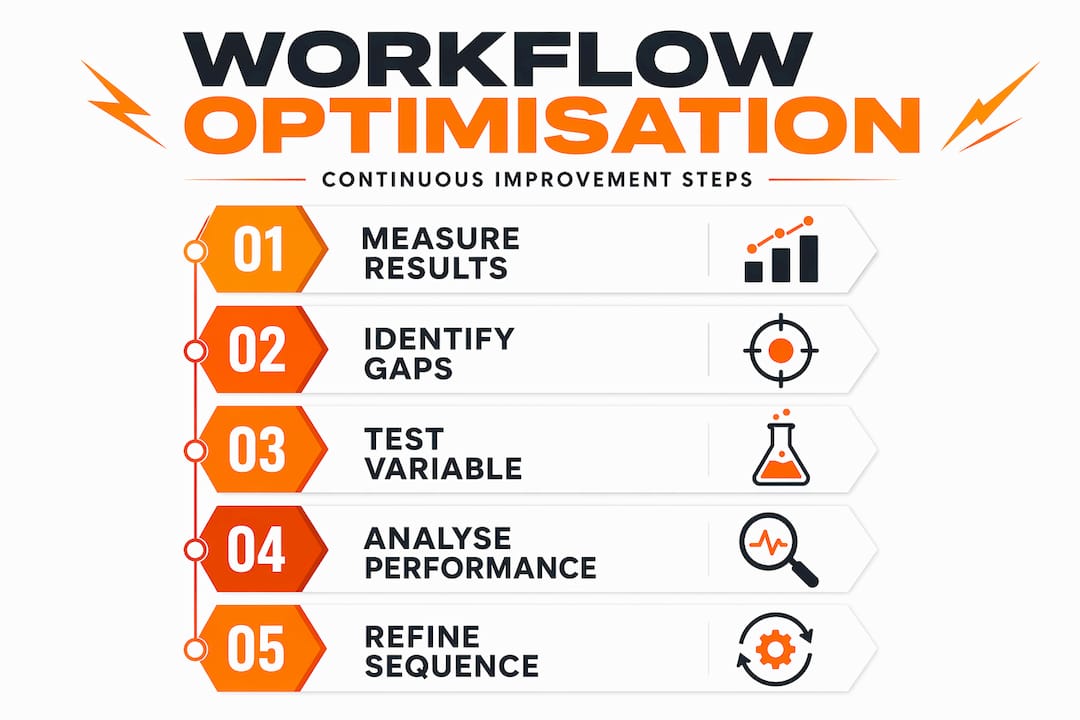
Email open rates are increasingly unreliable thanks to privacy changes like Apple Mail Privacy Protection. This means measuring downstream actions, conversions, repeat purchases, and revenue per subscriber, gives you a far more accurate picture of performance.
Key metrics to track by workflow type:
- Welcome series: conversion to first purchase, average time to purchase, email two to three drop-off rate
- Abandoned cart: recovery rate, revenue recovered, time-to-recover benchmarks
- Re-engagement: reactivation rate, list health improvement, unsubscribe rate per email
Engagement signals at the account level, such as consistent clicks and replies across multiple campaigns, influence inbox placement more than individual opens. Building workflows that encourage active replies or click-throughs, rather than passive reading, protects your sender reputation over time.
For iterative improvement, test one variable per sequence at a time: subject line, send time, or call-to-action placement. Running multiple simultaneous tests makes it impossible to attribute results accurately.
| Optimisation variable | What to test | Success indicator |
|---|---|---|
| Subject line | Personalised name vs. no name | Open rate uplift (with caveats) |
| Send timing | Morning vs. afternoon delivery | Click-through rate |
| CTA placement | Button at top vs. bottom of email | Conversion rate |
| Sequence length | 3-email vs. 5-email flow | Revenue per subscriber |
Using behavioural clustering to group subscribers by action patterns rather than demographics consistently produces stronger segmentation results. A subscriber who browses but never buys needs a different message than one who purchases frequently but never opens promotional emails.
My honest take on where most workflows go wrong
I have reviewed dozens of email setups across e-commerce brands, B2B services, and experience-based businesses. The pattern that keeps appearing is this: people build workflows to solve a sending problem when they actually have a strategy problem.
I have seen businesses with technically perfect automation, correct triggers, clean lists, proper authentication, producing flat results because nobody could clearly articulate what the workflow was supposed to do commercially. The goal was “nurture subscribers.” That is not a goal. That is a description of an activity.
What I have found actually works is treating each workflow like a mini product. It has a specific job. It has a defined audience. It has a measurable outcome. When you build that way, troubleshooting becomes obvious because you know exactly what success looks like.
The other thing I will say bluntly: integrating AI and marketing into your workflow strategy is no longer a future consideration. Inbox providers are already using AI to filter content at scale. Brands that use AI-driven automation to personalise at the segment level and respond to real-time signals are going to compound advantage over those still scheduling campaigns manually.
The businesses that win with email in 2026 will not necessarily send more. They will send smarter, based on better data, clearer goals, and workflows designed to behave like a sales team that never sleeps.
— Ryan
How Nulifedigital can build your growth engine
At Nulifedigital, email does not sit in a silo. It is part of a full digital growth system designed to turn qualified traffic into paying customers and keep them coming back.
Whether you need a complete e-commerce conversion strategy built around automated email sequences, or you want to integrate AI automation into your existing marketing infrastructure, the Nulifedigital team builds the systems behind the results. From workflow architecture and AI integration to high-converting landing pages that make every email click count, we handle the full stack. If you are ready to stop guessing and start scaling, get in touch for a bespoke workflow consultation.
FAQ
What is an email marketing workflow?
An email marketing workflow is an automated sequence of emails triggered by a specific subscriber action, event, or time interval. It removes the need for manual sending and delivers the right message based on where a subscriber is in the customer journey.
How many emails should a workflow contain?
Most effective workflows contain between three and seven emails, depending on the goal. Welcome sequences typically run three to five emails; re-engagement workflows are usually shorter, with two to three messages before inactive subscribers are suppressed.
Why are my automated emails going to spam?
The most likely cause is missing or misconfigured authentication records. DMARC, SPF, and DKIM must all be correctly set up before inbox providers will consistently deliver your mail, regardless of content quality.
What is the difference between a drip campaign and a workflow?
Drip email campaigns send a fixed sequence of emails on a set schedule regardless of subscriber behaviour. An email marketing workflow is dynamic: it responds to real-time actions and can branch into different sequences based on what a subscriber does or does not do.
How do I know if my workflow is actually working?
Track downstream actions rather than open rates alone. Conversion rate, revenue per subscriber, and sequence completion rate give you a clearer picture of commercial performance than opens, which are now distorted by privacy changes affecting measurement accuracy.
Recommended
- Build an effective digital marketing strategy workflow – Nu Life Digital
- Website conversion workflow that drives measurable growth – Nu Life Digital
- E-commerce funnel guide: Boost conversions and drive revenue – Nu Life Digital
- 2026’s top digital marketing trends for strategic growth – Nu Life Digital